खोज रहा है
वहाँ जाओ: अधिक > प्रशासन >सिस्टम प्राथमिकताएं >खोज रहा हैं
क्या आपका मतलब था / वर्तनी जाँच
LibrisKey
पूछता है: वर्तनी सेवा के लिए स्वीडिश सेवा। LIBRIS एपीआई कुंजी वर्तनी ___
विवरण:
LIBRIS वर्तनी जांच सेवा को सक्षम करने के लिए इस सिस्टम वरीयता का उपयोग करें।
You can obtain you API key at http://api.libris.kb.se/bibspell/
LibrisURL
पूछता है: LIBRIS आधार यूआरएल ___
डिफ़ॉल्ट: http://api.libris.kb.se/bibspell/
विवरण:
इस सिस्टम वरीयता का उपयोग LIBRIS वर्तनी सेवा API के लिए आधार URL सेट करने के लिए किया जाता है
डिफ़ॉल्ट मान सही होना चाहिए। सुनिश्चित करें कि आप केवल इसे बदल सकते हैं यदि आप सुनिश्चित हैं कि इसे बदलने की आवश्यकता है
विशेषताएं
BrowseResultSelection
पूछता है: ___ स्टाफ इंटरफ़ेस में ग्रंथ सूची रिकॉर्ड विवरण पृष्ठ से खोज परिणाम ब्राउज़ करना।
डिफ़ॉल्ट: अक्षम
मानः
अक्षम
सक्षम करें
विवरण:
Enabling this system preference makes a button appear in the staff interface search results page to browse the selected records.
ElasticsearchBoostFieldMatch
संस्करण
This system preference was added to Koha in version 25.05.
Asks: ___ adding a second 'match' field search to the ES query to boost relevancy.
मानः
अक्षम
सक्षम करें
डिफ़ॉल्ट: अक्षम
विवरण:
When enabled, this system preference automatically makes a second search to find exact matches to the search terms entered by the user. This effectively boosts exact matches to the top of the list.
Keyword and title searches will be boosted with the title-cover index. Other fields will boost directly.
महत्त्वपूर्ण
This system preference only works if defaultSortField and defaultSortOrder are set to 'relevance' and 'descending'.
महत्त्वपूर्ण
This will not boost CCL style searches. Only standard or advanced searches are affected.
ElasticsearchCrossFields
पूछता है: ___ एलिस्टिक्स खोज खोजों के लिए cross_fields विकल्प।
डिफ़ॉल्ट: सक्षम
मानः
अक्षम
सक्षम करें
टिप्पणी
Elasticsearch 6.X और इसके बाद के संस्करण में cross_fields विकल्प समर्थित है।
विवरण:
यह सिस्टम वरीयता नियंत्रित करती है कि Elasticsearch का cross_fields विकल्प सक्षम है या नहीं। चूंकि यह विकल्प केवल ES6 और इसके बाद के संस्करण के साथ काम करता है, पुराने संस्करण का उपयोग करने पर इस सिस्टम वरीयता को अक्षम किया जाना चाहिए।
Cross_fields विकल्प का उपयोग कीवर्ड खोजों में सभी क्षेत्रों में खोज करने के लिए किया जाता है। कोहा में, कीवर्ड खोजों को एक विशिष्ट 'कीवर्ड' इंडेक्स में खोज नहीं की जाती है, बल्कि सभी खोज योग्य सूचकांक में एक खोज है। Elasticsearch 6 के साथ, यदि Cross_fields अक्षम है, तो कीवर्ड खोज परिणाम वापस कर देगी जहां खोज शब्द सभी एक ही सूचकांक में दिखाई देते हैं (उदाहरण के लिए, 'शीर्षक' सूचकांक)। यदि Cross_fields सक्षम है, तो कीवर्ड खोज उन परिणामों को वापस कर देगी जहां खोज शब्द किसी भी सूचकांक में दिखाई देते हैं।
टिप्पणी
उदाहरण के लिए, Elasticsearch 6 के साथ "किंग ग्रास" के लिए एक कीवर्ड खोज निम्नलिखित परिणामों को वापस कर देगी
ElasticsearchCrossFields के साथ अक्षम:
The Island of the Grass King by Nancy Willard (grass in title/king in title)
ElasticsearchCrossFields सक्षम के साथ:
The Island of the Grass King by Nancy Willard (grass in title/king in title)
In the tall grass by Stephen King (grass in title/king in author)
Visit https://www.elastic.co/docs/reference/query-languages/query-dsl/query-dsl-multi-match-query#type-cross-fields for more information on this option.
ElasticsearchPreventAutoTruncate
संस्करण
This system preference was added to Koha in version 24.05.
It was renamed from ESPreventAutoTruncate to ElasticsearchPreventAutoTruncate in Koha 25.11.
Asks: List of search fields (separated by | or ,) that should not be autotruncated by Elasticsearch even if QueryAutoTruncate is set to 'Yes': ___
Values: any Elasticsearch index name
Default: barcode|control-number|control-number-identifier |date-of-acquisition|date-of-publication|date-time-last-modified |identifier-standard|isbn|issn|itype|lc-card-number |number-local-acquisition|other-control-number|record-control-number
विवरण:
This system preference determines which Elasticsearch indexes are not automatically truncated. This is useful for identifier indexes, such as barcode and control-number, as truncating an identifier can return many irrelevant results.
This system preference is only used when Elasticsearch is the search engine (SearchEngine system preference) and the QueryAutoTruncate system preference is set to 'automatically'.
EnableSearchHistory
पूछता है: ___ कर्मचारी इंटरफ़ेस में संरक्षक खोज इतिहास।
डिफ़ॉल्ट: न रखें
मानः
न रखें
रखें
विवरण:
This system preference controls whether the staff interface keeps search history for logged in users. Search history will be accessible under the link to your account at the top right of the staff interface.

IncludeSeeAlsoFromInSearches
संस्करण
This feature was first introduced in version 24.11 of Koha.
Asks: ___ see also from headings in bibliographic searches. Please note: you will need to reindex your bibliographic database when changing this preference.
मानः
शामिल न करें
शामिल करें
डिफ़ॉल्ट: शामिल न करें
विवरण:
When this system preference is set to 'Include', the search engine indexer will insert see also from headings from authority records (fields 5XX) into bibliographic records when indexing, so that a search on a term will also return records with the related terms.
For example, when set to 'Include': if your authority record for 'Internet literacy' has 'Information literacy' (broader heading) in the 550 field, when searching for 'Information literacy' you will also see titles that use solely the narrower heading 'Internet literacy'.
चेतावनी
You will need to do a reindex of your bibliographic records to see the effect of changing this system preference.
IncludeSeeFromInSearches
Asks: ___ see from (non-preferred form) headings in bibliographic searches.
मानः
शामिल न करें
शामिल करें
डिफ़ॉल्ट: शामिल न करें
विवरण:
When this system preference is set to 'Include', the search engine indexer will insert see from headings from authority records (fields 4XX) into bibliographic records when indexing, so that a search on an obsolete term will return newer relevant records. For example, searching for 'cookery' (the old term) will also return titles with the heading 'cooking' (the new term).
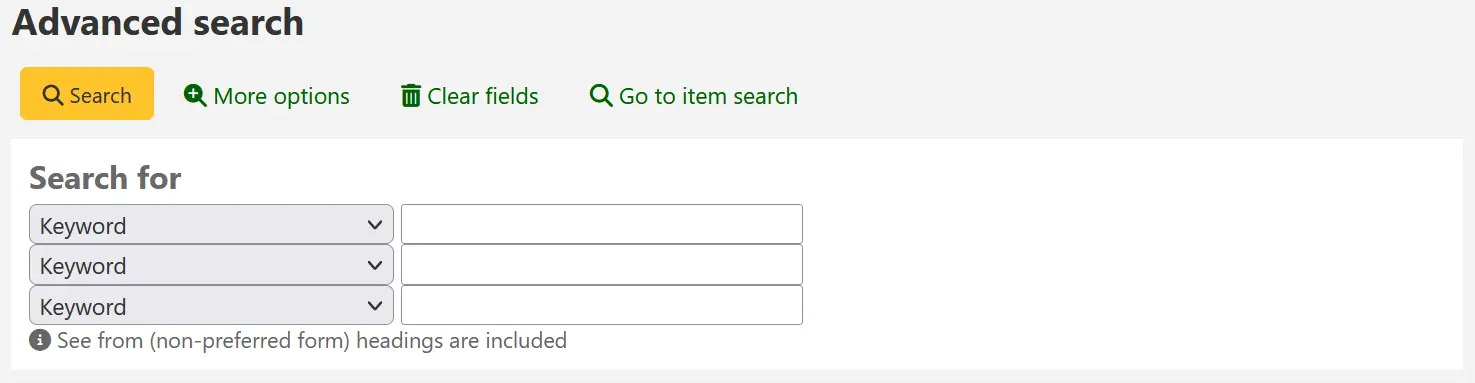
चेतावनी
You will need to do a reindex of your bibliographic records to see the effect of changing this system preference.
QueryAutoTruncate
पूछता है: वाइल्डकार्ड खोज करें (उदाहरण के लिए, हर हैरी और वीर से मेल खाएगा) ___ (* चरित्र का उपयोग इस प्रकार किया जाएगा: Har* or *logging.)
डिफ़ॉल्ट: स्वचालित रूप से
मानः
स्वचालित
अगर केवल * जोड़ा जाता है
विवरण:
यह सेटिंग खोजों को स्वचालित रूप से छोटा करने या खोज स्ट्रिंग के अंत में अतिरिक्त वर्णों को जोड़ने की अनुमति देती है। जब "स्वचालित रूप से" पर सेट किया जाता है तो खोज स्ट्रिंग स्वचालित रूप से वाइल्डकार्ड फ़ंक्शन के साथ समाप्त हो जाती है। उदाहरण के लिए, ऑटो ट्रंकेशन सक्षम के साथ "आविष्कार" शब्द की खोज से आविष्कारक, आविष्कार, इन्वेंट्री आदि के परिणाम भी प्राप्त होंगे।
यदि आप नहीं चाहते कि यह स्वचालित रूप से घटित हो, तब भी आप तारक चिह्न (*) जोड़कर मैन्युअल रूप से वाइल्डकार्ड खोज कर सकते हैं। स्वत: ट्रंकेशन अक्षम होने पर भी "आविष्कार*" टाइप करने से समान आविष्कारक, आविष्कार, इन्वेंट्री परिणाम प्राप्त होंगे।
ऑटो ट्रंकेशन लंबी खोज स्ट्रिंग्स को उनकी संपूर्णता में टाइप करने की आवश्यकता को दरकिनार कर देता है, लेकिन बहुत सारे अवांछित परिणाम लौटा सकता है।
टिप्पणी
Regardless of this system preference, search engines prevent autotruncation for some search fields.
Zebra prevents the autotruncation for:
yr (date of publication)
acqdate (date of acquisition)
nb (ISBN)
ns (ISSN)
hi (host itemnumber)
As well as any CCL search
with the index specified before the search term (for example, sn:1234
or an:4321), or with one of these search types specified after the
index: st-*, phr, or ext (for example,
ti,phr:kittens).
Elasticsearch prevents the autotruncation for:
biblioitemnumber
host-item-number
itemnumber
koha-auth-number
local-number
As well as any search field defined as boolean, sum, or year in the mappings and any other index listed in the ESPreventAutoTruncate system preference.
The prevention of truncation is there so that searches (mostly for identifiers) do not return irrelevant results.
यह भी देखें:
QueryFuzzy
पूछता है: ___ खोज में समान वर्तनी वाले शब्दों का मिलान करने के लिए (उदाहरण के लिए, flang की खोज flange और fang से भी मेल खाएगी)
डिफ़ॉल्ट: प्रयास करें
मानः
प्रयास नही करें
प्रयास
विवरण:
यह सिस्टम वरीयता "फजी" खोज को सक्षम करती है, जिसमें खोज इंजन परिणाम देता है जो समान हैं, लेकिन बिल्कुल मिलान नहीं, उपयोगकर्ता द्वारा दर्ज किए गए शब्द या शब्द। यह प्रणाली वरीयता खोज फ़ंक्शन को थोड़ा गलत नाम या वाक्यांशों की भरपाई करने में सक्षम बनाती है।
चेतावनी
यदि आपके सिस्टम में ICU सक्षम है तो यह काम नहीं करता है।
चेतावनी
यह सिस्टम वरीयता केवल ज़ेबरा के साथ काम करती है। इलास्टिक्स खोज का उपयोग करते समय, शब्द के ठीक बाद एक टिल्ड (~) जोड़कर एक अस्पष्ट खोज की जा सकती है। उदाहरण के लिए, फ्लैंग ~।
QueryRegexEscapeOptions
Asks: ___ regular expressions within query strings.
डिफ़ॉल्ट: एस्केप
मानः
बचो मत
एस्केप
अनएस्केप्ड भाग निकले
विवरण:
यदि खोज के संदर्भ में 'एस्केप' को '/' का चुना जाता है, तो स्वचालित रूप से बच निकलेगा, और नियमित अभिव्यक्तियों को नियमित स्ट्रिंग्स के रूप में व्याख्या किया जाएगा। दूसरे शब्दों में, नियमित अभिव्यक्तियाँ अक्षम हैं और खोज शब्द के रूप में खोज की जाती है (उदाहरण के लिए, 'एक आवश्यक व्याकरण / विलियम जेड शेट्टर')।
यदि 'Unescape बच गया' चुना जाता है तो यह नियमित अभिव्यक्ति लिखने की अनुमति देगा '/like this/'' while '/this/', or / this 'बच जाएगा और नियमित स्ट्रिंग के रूप में व्याख्या की जाएगी। दूसरे शब्दों में, यदि आप अपने खोज प्रश्नों में नियमित अभिव्यक्ति का उपयोग करने में सक्षम होना चाहते हैं तो इस विकल्प का उपयोग करें।
यदि 'नहीं बचता' चुना जाता है, तो एलीटेसर्च खोज इंजन का डिफ़ॉल्ट व्यवहार अनछुए रह जाएगा। कई पात्रों की व्याख्या एक नियमित अभिव्यक्ति के भाग के रूप में की जाएगी, जैसे कि आगे की स्लैश (/).
चेतावनी
This system preference is used with Elasticsearch only. If you use Zebra as your SearchEngine, it will not change anything.
QueryStemming
पूछता है: ___खोज में एक ही आधार के शब्दों से मिलान करने के लिए
डिफ़ॉल्ट: प्रयास करें
मानः
प्रयास नही करें
प्रयास
विवरण:
यह प्रणाली वरीयता शब्द को स्टेमिंग में सक्षम बनाती है। Stemming खोज फ़ंक्शन को एक ही शब्द के कई संस्करणों को वापस करने की अनुमति देता है, साथ ही संबंधित शब्द (यानी, मछली और मछली पकड़ने दोनों को वापस कर दिया जाएगा)।
चेतावनी
इस सिस्टम वरीयता का उपयोग ज़ेबरा के साथ ही किया जाता है। Elasticsearch खोज को स्वचालित रूप से स्टेमिंग करता है।
QueryWeightFields
पूछता है: प्रासंगिकता द्वारा खोज परिणामों की ___ रैंकिंग
डिफ़ॉल्ट: सक्षम
मानः
अक्षम
सक्षम करें
विवरण:
प्रासंगिकता के आधार पर खोज परिणामों की छँटाई को सक्षम या अक्षम करने के लिए इस सिस्टम वरीयता का उपयोग किया जाता है।
चेतावनी
इस सिस्टम वरीयता का उपयोग ज़ेबरा के साथ ही किया जाता है।
SavedSearchFilters
पूछता है: ___कस्टम सहेजे गए खोज फ़िल्टर बनाने/संपादित करने की अनुमति के साथ कर्मचारियों के लिए विकल्प।
डिफ़ॉल्ट: अक्षम
मानः
अक्षम
सक्षम करें
विवरण:
जब सक्षम हो जाता है, तो यह सिस्टम वरीयता इस संभावना को जोड़ देगा खोज फिल्टर के रूप में खोज सहेजे।
Staff members need the manage_search_filters permission (or the superlibrarian permission) to be able to create and edit saved search filters.
SearchCancelledAndInvalidISBNandISSN
संस्करण
This feature was first introduced in version 24.11 of Koha.
Asks: ___ search for cancelled or invalid forms of ISBN/ISSN when performing ISBN/ISSN search (when using Elasticsearch).
मानः
नही करना
करें
डिफ़ॉल्ट: नही करेें
विवरण:
This system preference controls whether an ISBN or ISSN search will return records that have the search term in the 020$z MARC field (Canceled/invalid ISBN) or 022$z (Canceled ISSN) respectively.
Canceled or invalid ISBN or ISSN will be returned by a keyword search regardless. This system preference applies solely when searching the ISBN or ISSN fields.
This system preference is only relevant if using Elasticsearch as the Koha search engine. If your SearchEngine system preference is set to 'Zebra', SearchCancelledAndInvalidISBNandISSN will not apply.
TraceCompleteSubfields
पूछता है: ___ ओपेक और स्टाफ इंटरफेस में विषय ट्रेसिंग केवल पूर्ण-सबफील्ड मैचों के लिए खोज करने के लिए।
डिफ़ॉल्ट: बल
मानः
बल मत करें
विषय खोजशब्दों के लिए खोज (उदाहरण: opac-search.pl?q=su:World%20Wide%20Web)
बल
पूरा विषय क्षेत्रों (: opac-search.pl?q=su,complete-subfield:World%20Wide%20Web उदाहरण) के लिए खोजें
विवरण:
जब TraceCompleteSubfields को 'बल' पर सेट किया जाता है, तो गैर-प्राधिकरण नियंत्रित विषय ट्रेसिंग में लिंक पर क्लिक करने से केवल अन्य रिकॉर्ड मिलेंगे जहाँ पूरे सबफ़ील्ड मिलते हैं। इसे "बल न दें" पर छोड़ने से विषय अनुक्रमणिका की खोजशब्द खोज होती है।
चेतावनी
यह वरीयता मानती है कि XSLT स्टाइलशीट का उपयोग किया जाता है, जैसा कि OPACXSLTDetailsDisplay or XSLTDetailsDisplay सिस्टम प्राथमिकताओं में सेट किया गया है।
TraceSubjectSubdivisions
पूछता है: ___विषय ट्रेसिंग पर क्लिक करके उत्पन्न होने वाली खोजों के लिए उप विभाजनों.
डिफ़ॉल्ट: शामिल
मानः
शामिल न करें
विषय खोजशब्दों के लिए खोज (उदाहरण: opac-search.pl?q=su,complete-subfield:%22Web%20sites%22)
शामिल करें
पूरा विषय क्षेत्रों के लिए खोज (उदाहरण: opac-search.pl?q=(su,complete-subfield:%22Web%20sites%22)%20and%20(su,complete-subfield:%22Design.%22))
विवरण:
जब tracesubjectsubdivisions को 'शामिल' करने के लिए सेट किया जाता है, यदि आप किसी विषय पर उपखंडों के साथ क्लिक करते हैं ('ए' के अलावा अन्य उप -क्षेत्र) उन्हें विषय शीर्षक (सबफील्ड 'ए') के साथ खोजा जाएगा। केवल विषय शीर्षक (सबफील्ड 'ए') को खोजने के लिए, इस प्रणाली को "शामिल न करें" के लिए निर्धारित करें।
चेतावनी
यह वरीयता मानती है कि XSLT स्टाइलशीट का उपयोग किया जाता है, जैसा कि OPACXSLTDetailsDisplay or XSLTDetailsDisplay सिस्टम प्राथमिकताओं में सेट किया गया है।
UseICUStyleQuotes
पूछता है ___ आईसीयू शैली उद्धरण ({}) जब विषयों को ट्रेस करते समय।
डिफ़ॉल्ट: प्रयोग नही करें
मानः
उपयोग नहीं करें
उपयोग
विवरण:
यह सिस्टम प्राथमिकता आपको यह तय करने देती है कि विषयों को ट्रेस करते समय किस शैली के उद्धरण चिह्नों का उपयोग किया जाए।
यदि "उपयोग न करें" पर सेट किया जाता है, तो नियमित दोहरे उद्धरण ("") का उपयोग किया जाएगा
यदि "उपयोग" पर सेट किया जाता है, तो उद्धरणों को घुंघराले कोष्ठक ({}) से बदल दिया जाएगा
z3950Status
संस्करण
This system preference was added to Koha in version 24.11.
Asks: ___ Define custom rules to show specific items as not available in Z39.50. Rules are defined with item database fields as keys and an array of values.
विवरण:
This system preference is used to mark items as unavailable in Z39.50 searches.
To define rules, enter an item database field followed by a value or list of values. For example:
ccode: [REF, ARC]
This will mark all items with with either the collection code REF, or the collection code ARC as unavailable in the Z39.50 search results.
There can be multiple rules, items meeting any of the criteria will be marked as unavailable. For example:
itype: [REF]
holdingbranch: [REPAIR]
This will mark any item with the item type REF as unavailable, as well as any item with the current library REPAIR.
चेतावनी
Requires YAML syntax to work.
This means
Make sure there is NO space between the field name and the colon
Make sure there IS a space between the colon and the value
If there are more than one values for the same field, put them in square brackets, separated by comma and space
Make sure each pair is on its own line
परिणाम प्रदर्शन
BiblioItemtypeInfo
पूछता है: ___ कोहा रिकॉर्ड-स्तरीय आइटम टाइप जानकारी और ओपेक और स्टाफ इंटरफ़ेस में विस्तार और परिणाम पृष्ठों पर जानकारी।
डिफ़ॉल्ट: नहीं दिखाएं
मानः
नहीं दिखाएँ
दिखाना
विवरण:
यदि सक्षम किया जाता है, तो रिकॉर्ड आइटम प्रकार (942$c) के लिए आइकन ओपेक और स्टाफ इंटरफ़ेस दोनों में रिकॉर्ड विवरण और खोज परिणाम पृष्ठों पर प्रदर्शित किए जाएंगे।
यह जानकारी यह भी प्रदर्शित करती है कि क्या item-level_itypes सिस्टम वरीयता ग्रंथ सूची के रिकॉर्ड पर सेट है।
defaultSortField और defaultSortOrder
पूछता है: डिफ़ॉल्ट रूप से, स्टाफ़ इंटरफ़ेस में खोज परिणामों को ___, ___ द्वारा सॉर्ट करें
डिफ़ॉल्ट: प्रासंगिकता (डिफ़ॉल्ट सॉर्टफ़ील्ड), अवरोही (डिफ़ॉल्ट सॉर्टऑर्डर)
मानः
defaultSortField
तिथि जोड़ी गई
लेखक
कॉल संख्या
चैकआउटस की कुल संख्या
प्रकाशन की तिथि
प्रासंगिकता
title
defaultSortOrder
आरोही
ए से जेड तक
अवरोही
जेड से ए तक
विवरण:
ये वरीयताएँ स्टाफ़ इंटरफ़ेस में खोजों के लिए डिफ़ॉल्ट सॉर्ट फ़ील्ड और सॉर्ट क्रम सेट करती हैं।
Regardless of this setting, the other sort options are still available in the advanced search form and the search results page.
यह भी देखें:
displayFacetCount
Asks: ___ facet counts.
मानः
नहीं दिखाएँ
दिखाना
डिफ़ॉल्ट: नहीं दिखाएं
विवरण:
This system preference lets you decide if you show how many times a facet is used in your search results in the OPAC and the staff interface.
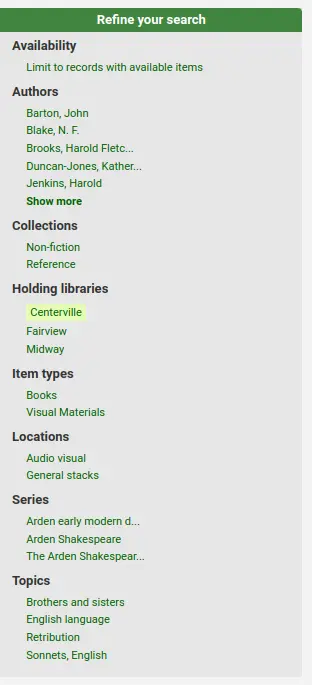
The relevance of these numbers depends on the value of maxRecordsForFacets.
Showing these numbers can potentially affect the performance of your searching, so test your system with different values for this system preference to see what works best.
चेतावनी
This system preference only works with Zebra. Elasticsearch shows the facet count by default, and does not affect search performance.
DisplayLibraryFacets
पूछता है: के लिए पहलुओं दिखाएँ ___
डिफ़ॉल्ट: होल्डिग लाइब्रेरी
मानः
दोनों घर और होल्डिग लाइब्रेरी
होल्डिंग पुस्तकालय
होम लाइब्रेरी
विवरण:
This system preference controls the 'libraries' facet that displays on the search results page in the staff interface and the OPAC. The value selected here will determine which libraries show in the facets when a search is run.
चेतावनी
As of Koha version 24.05, this system preference is only used by Zebra. Facets in Elasticsearch are configurable in Search engine configuration.
FacetLabelTruncationLength
पूछता है: ओपेक/ स्टाफ इंटरफ़ेस में ___ र्णों के लिए पहलुओं की लंबाई को छोटा करें.
डिफ़ॉल्ट: 20
विवरण:
ओपेक और स्टाफ इंटरफेस में, पहलुओं को डिफ़ॉल्ट रूप से 20 वर्णों में काट दिया जाता है। लेआउट के आधार पर यह बहुत अधिक या बहुत कम अक्षर हो सकते हैं। यह प्रणाली वरीयता आपको यह तय करने देती है कि आपकी लाइब्रेरी के डिज़ाइन के लिए कौन सी संख्या सबसे अच्छी है।
चेतावनी
This preference only works with Zebra. When using Elasticsearch, facets cannot be truncated, they will be displayed in full.
FacetMaxCount
पूछता है: प्रत्येक श्रेणी के पहलुओं के लिए ___ दिखाएं.
डिफ़ॉल्ट: 20
विवरण:
This system preference allows you to control how many possible limits show under each heading (Author, Series, Topics, etc) in the facets in the staff interface and OPAC.
FacetOrder
पूछता है: प्रत्येक श्रेणी के लिए पहलुओं को ___ क्रमबद्ध करें।
डिफ़ॉल्ट: वर्णानुक्रम में
मानः
वर्णानुक्रम
उपयोग गणना द्वारा
विवरण:
यह वरीयता आपको प्रत्येक श्रेणी (लेखक, श्रृंखला, विषय, आदि) में पहलुओं के क्रम को नियंत्रित करने की अनुमति देती है।
डिफ़ॉल्ट रूप से, पहलुओं को वर्णानुक्रम में क्रमबद्ध किया जाता है। लेकिन उन्हें सबसे अधिक घटनाओं के साथ कम से कम घटनाओं के साथ क्रमबद्ध करना संभव है।
If using the alphabetical order, make sure to set the locale in FacetSortingLocale to ensure diacritics are sorted correctly.
maxItemsInSearchResults
पूछता है: खोज परिणामों में प्रति ग्रंथ सूची रिकॉर्ड ___ आइटम तक दिखाएं।
डिफ़ॉल्ट: 20
विवरण:
This system preference will let you set how many items are displayed for each record in the search results in the staff interface.
maxRecordsForFacets
पूछता है: खोज परिणामों से ___ रिकॉर्ड पर आधारित पहलुओं का निर्माण करें.
डिफ़ॉल्ट: 20
विवरण:
By default, Koha only bases facets on the first twenty search results. This system preference lets you tell Koha to base the facet descriptions and numbers on any number of search results returned.
चेतावनी
This system preference only works with Zebra. The higher this number the longer it will take for your search results to return, so test with different values to find the best balance according to your system resources.
Elasticsearch shows the total number of facets by default.
MaxSearchResultsItemsPerRecordStatusCheck
पूछता है: कई आइटमों के साथ रिकॉर्ड के लिए, केवल पहले ___ आइटम के लिए उपलब्धता की स्थिति की जांच करें.
डिफ़ॉल्ट: 20
विवरण:
Availability statuses may show incorrectly in search results if a record has more items than the limit set.
टिप्पणी
रिकॉर्ड विवरण में स्थितियां सही ढंग से प्रदर्शित होंगी।
बिना किसी सीमा के खाली छोड़ दें।
numSearchResults
पूछता है: डिफ़ॉल्ट रूप से, कर्मचारी इंटरफ़ेस में प्रति पृष्ठ ___ परिणाम दिखाएं।
डिफ़ॉल्ट: 20
विवरण:
This system preference allows you to choose the default number of results per page in search results in the staff interface.
यदि आप चाहते हैं कि उपयोगकर्ता उस नंबर को बदल सकें, तो the numSearchResultsDropdown सिस्टम प्राथमिकता को सक्षम करें।
ओपेक में प्रति पृष्ठ परिणामों की डिफ़ॉल्ट संख्या को परिभाषित करने के लिए OPACnumSearchResults का उपयोग करें।
numSearchResultsDropdown
पूछता है: ___ कर्मचारी इंटरफ़ेस खोज परिणामों पर प्रति पृष्ठ ड्रॉपडाउन परिणाम।
डिफ़ॉल्ट: नहीं दिखाएं
मानः
नहीं दिखाएँ
दिखाना
विवरण:
If set to 'Show' this system preference will make a drop down menu appear in the search results allowing the user to choose how many results they want to see per page.
डिफ़ॉल्ट मान क्या है यह निर्धारित करने के लिए numSearchResults का उपयोग करें।
यदि ओपेक में ड्रॉपडाउन दिखाई देता है, तो परिभाषित करने के लिए OPACnumSearchResultsDropdown का उपयोग करें।
OPACdefaultSortField और OPACdefaultSortOrder
पूछताछ: डिफ़ॉल्ट रूप से, ओपेक में ___, ___ द्वारा क्रमबद्ध खोज परिणाम
डिफ़ॉल्ट: प्रासंगिकता (OPACdefaultSortField), अवरोही (OPACdefaultSortOrder)
मानः
OPACdefaultSortField
तिथि जोड़ी गई
लेखक
कॉल संख्या
चैकआउटस की कुल संख्या
प्रकाशन की तिथि
प्रासंगिकता
title
OPACdefaultSortOrder
आरोही
ए से जेड तक
अवरोही
जेड से ए तक
विवरण:
ये प्रणाली प्राथमिकताएं डिफ़ॉल्ट क्रमबद्ध क्षेत्र की स्थापना की और ओपेक पर खोजों के लिए आदेश तरह. अपनी पसंद के बावजूद, अन्य प्रकार का विकल्प अभी भी उन्नत खोज पृष्ठ पर ड्रॉप डाउन सूची में उपलब्ध हैं.
यह भी देखें:
OPACnumSearchResults
पूछता है: डिफ़ॉल्ट रूप से, ओपेक में प्रति पृष्ठ ___ परिणाम दिखाएं.
डिफ़ॉल्ट: 20
विवरण:
यह सिस्टम वरीयता आपको स्टाफ इंटरफ़ेस में खोज परिणामों में प्रति पृष्ठ परिणामों की डिफ़ॉल्ट संख्या चुनने की अनुमति देती है।
यदि आप चाहते हैं कि उपयोगकर्ता उस नंबर को बदल सकें, तो OPACnumSearchResultsDropdown सिस्टम प्राथमिकता को सक्षम करें।
स्टाफ इंटरफ़ेस में प्रति पृष्ठ परिणामों की डिफ़ॉल्ट संख्या को परिभाषित करने के लिए numSearchResults का उपयोग करें।
OPACnumSearchResultsDropdown
पूछता है: ओपेक खोज परिणामों पर प्रति पृष्ठ ड्रॉपडाउन प्रति ___ परिणाम
डिफ़ॉल्ट: नहीं दिखाएं
मानः
नहीं दिखाएँ
दिखाना
विवरण:
यदि 'शो' पर सेट किया जाता है, तो यह सिस्टम वरीयता खोज परिणामों में एक ड्रॉप डाउन मेनू बना देगा जो उपयोगकर्ता को यह चुनने की अनुमति देगा कि वे प्रति पृष्ठ कितने परिणाम देखना चाहते हैं।
डिफ़ॉल्ट मान क्या है यह निर्धारित करने के लिए OPACnumSearchResults का उपयोग करें।
numSearchResultsDropdown का उपयोग यह परिभाषित करने के लिए करें कि क्या ड्रॉपडाउन स्टाफ इंटरफ़ेस में दिखाई देता है।
PassItemMarcToXSLT
Asks: ___ make item MARC fields (MARC21 952, UNIMARC 995) available to XSLT stylesheets for OPAC and staff interface results pages.
डिफ़ॉल्ट: नही करेें
मानः
नही करना
करें
विवरण:
यह सिस्टम वरीयता निर्धारित करती है कि आइटम फ़ील्ड प्रदर्शन के लिए XSLT स्टाइलशीट में पास किए गए हैं या नहीं।
आइटम प्रदर्शित करने वाली कस्टम XSLT स्टाइलशीट का उपयोग करने पर ही सक्षम करें।
यदि डिफ़ॉल्ट XSLT स्टाइलशीट का उपयोग किया जाता है, तो आइटम इन स्टाइलशीट का उपयोग करके नहीं बल्कि विभिन्न विधियों (होल्डिंग टेबल) के माध्यम से प्रदर्शित होते हैं, इसलिए इन फ़ील्ड को XSLT स्टाइलशीट के लिए उपलब्ध कराना आवश्यक नहीं है।
कस्टम स्टाइलशीट के लिए निम्नलिखित सिस्टम प्राथमिकताओं का उपयोग करें:
यदि यह सिस्टम वरीयता अक्षम है, तो डिफ़ॉल्ट XSLT स्टाइलशीट का उपयोग करते समय रिकॉर्ड तेज़ी से प्रदर्शित होते हैं।
RedirectToSoleResult
Asks: ___ to the result if a catalog search via the OPAC or staff interface returns only one record.
Default: Redirect
मानः
Don't redirect
Redirect
विवरण:
This system preference determines whether or not the user is redirected to the detailed record when there is only one search result.
RetainCatalogSearchTerms
पूछता है: ___ स्टाफ इंटरफ़ेस हेडर में 'सर्च द कैटलॉग' टैब से खोज करते समय खोजों के बीच खोज शब्द।
डिफ़ॉल्ट: बनाए रखें
मानः
नहीं बनाए रखना
बनाए रखना
विवरण:
इस सिस्टम वरीयता का उपयोग यह निर्धारित करने के लिए किया जाता है कि क्या या नहीं, स्टाफ इंटरफेस में कैटलॉग खोजों के लिए, खोज शब्द खोज शुरू होने के बाद पृष्ठ के शीर्ष पर सर्च बार में प्रवेश किया गया।।
यदि "नहीं बनाए रखने" के लिए सेट किया गया है, तो खोज शुरू होने के बाद खोज बार को खाली कर दिया जाएगा।।
यदि "रिटेन" पर सेट किया जाता है, तो खोज शब्द खोज बार में रहेगा।
RetainPatronsSearchTerms
पूछता है: ___स्टाफ इंटरफ़ेस हेडर में 'चेकआउट' और 'सर्च संरक्षक' टैब से खोज करते समय खोजों के बीच खोज शब्द।
डिफ़ॉल्ट: बनाए रखें
मानः
नहीं बनाए रखना
बनाए रखना
विवरण:
इस सिस्टम वरीयता का उपयोग यह निर्धारित करने के लिए किया जाता है कि स्टाफ इंटरफेस में चेकआउट और संरक्षक खोज के लिए, खोज शब्द खोज शुरू होने के बाद पृष्ठ के शीर्ष पर सर्च बार में प्रवेश किया गया।।
यदि "नहीं बनाए रखने" के लिए सेट किया गया है, तो खोज शुरू होने के बाद खोज बार को खाली कर दिया जाएगा।।
यदि "रिटेन" पर सेट किया जाता है, तो खोज शब्द खोज बार में रहेगा।
SearchLimitLibrary
पूछता है: किसी लाइब्रेरी या लाइब्रेरी समूह के साथ खोज परिणामों को सीमित करते समय, आइटम के ___ द्वारा सीमित करें।
डिफ़ॉल्ट: होम लाइब्रेरी
मानः
होम लाइब्रेरी और होल्डिग लाइब्रेरी
होल्डिंग पुस्तकालय
होम लाइब्रेरी
विवरण:
This system preference lets you decide which library is used when limiting by library
SearchWithISBNVariations
पूछता है: आईएसबीएन सूचकांक पर खोज करते समय, ___ आईएसएएन के सभी रूपों पर.
डिफ़ॉल्ट: खोज न करें
मानः
खोज न करें
खोज
विवरण:
इस सिस्टम वरीयता के साथ खोज करने के लिए सेट आप आईएसबीएनएस के लिए खोज कर पाएंगे, भले ही क्षेत्र में डैश या रिक्त स्थान हों। इसलिए यदि आप 9781843345855 के लिए खोज करते हैं, लेकिन आईएसबीएन को 978-1843345855 के रूप में सूचीबद्ध किया गया था, तो आप अभी भी इसे ढूंढ पाएंगे यदि यह सिस्टम वरीयता 'खोज' पर सेट है।
SearchWithISSNVariations
पूछता है: ISSN इंडेक्स पर खोज करते समय, ISSN के सभी रूपों पर ___
डिफ़ॉल्ट: खोज न करें
मानः
खोज न करें
खोज
विवरण:
यदि यह सिस्टम वरीयता 'खोज' पर सेट है, तो आप हाइफ़न के बिना ISSNS खोज कर पाएंगे। उदाहरण के लिए, 12345678 की खोज में ऐसे रिकॉर्ड मिलेंगे जिनमें ISSN 1234-5678 है।
यह प्रणाली वरीयता वर्तमान में काम करती है उन्नत खोज, जब ISSN इंडेक्स का उपयोग करते हैं, और ऑर्डर अधिग्रहण में उन्नत खोज.
ShowHeadingUse
Asks: ___ whether a MARC21 authority record contains an established heading that conforms to descriptive cataloguing rules, and can therefore be used as a main/added entry, or subject, or series title.
मानः
नहीं दिखाएँ
दिखाना
डिफ़ॉल्ट: नहीं दिखाएं
विवरण:
When this system preference is enabled, the intended use of the authority record will be shown in an authority search.
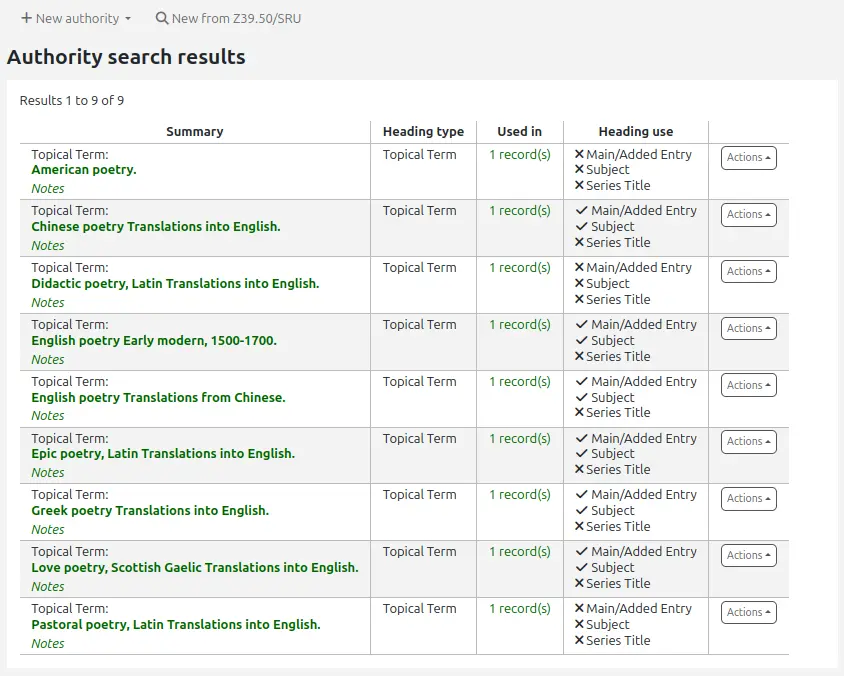
This is based on MARC21 field 008, positions 14 to 16, that indicate if an authority record is appropriate for use in a main or added entry heading, a subject heading, or a series heading.
महत्त्वपूर्ण
This system preference only works in MARC21 systems.
खोज फ़ॉर्म
AdvancedSearchLanguages
पूछता है: उन्नत खोज ड्रॉप-डाउन में सूचीबद्ध भाषाओं को ___आईएसओ 639-2 भाषा कोड ( | या, के साथ अलग मान) तक सीमित करें।
विवरण:
This system preference will allow you to decide which languages show in the drop down menu on the advanced search page in the OPAC and the staff interface.
If this preference is left blank, all languages will show. To limit the languages that are shown enter their ISO 639-2 language codes separated by comma ( , ) or pipe ( | ). For example to limit listing to French and Italian, enter ita|fre.
AdvancedSearchTypes
पूछता है: ___ फ़ील्ड पर खोजों को सीमित करने के लिए स्टाफ़ इंटरफ़ेस उन्नत खोज में टैब दिखाएं।
डिफ़ॉल्ट: आइटमप्रकार
विवरण:
स्टाफ़ इंटरफ़ेस में उन्नत खोज पृष्ठ पर, आप निम्न में से एक या सभी पर फ़िल्टर की अनुमति देना चुन सकते हैं: आइटम प्रकार (आइटम प्रकार), संग्रह कोड (ccode) और शेल्विंग स्थान (loc)।
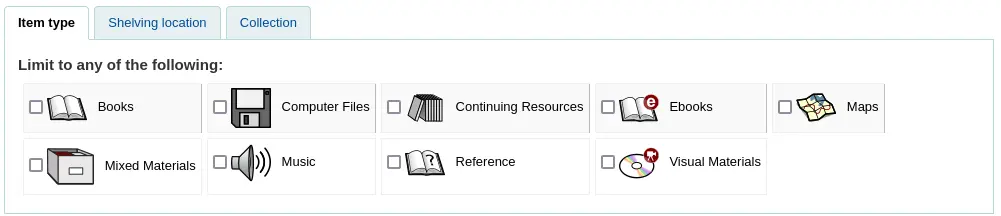
एक पाइप (|) के साथ कई मानों को अलग करें। उदाहरण के लिए, आइटम प्रकार और शेल्विंग स्थान पर खोजों को सीमित करने की अनुमति देने के लिए itemtypes|loc दर्ज करें।
जिस क्रम में सिस्टम वरीयता में विकल्प दर्ज किए जाते हैं वह वह क्रम है जिसमें टैब दिखाई देंगे। सिस्टम वरीयता में पहला विकल्प चयनित टैब है।
यदि खाली छोड़ दिया जाता है, तो "आइटम प्रकार" का प्रयोग किया जाता है।
खोज प्रकार में मान एक साथ OR'ed होते हैं, जबकि प्रत्येक भिन्न खोज प्रकार क्वेरी सीमा में एक साथ AND'ed होता है।
यह भी देखें:
expandedSearchOption
पूछता है: डिफ़ॉल्ट रूप से, ओपेक और स्टाफ इंटरफ़ेस उन्नत खोज पृष्ठों पर ___ "अधिक विकल्प"।
डिफ़ॉल्ट: नहीं दिखाएं
मानः
नहीं दिखाएं
दिखाना
विवरण:
This system preference lets you decide if the 'More options' search options (such as date and language limits) are displayed by default of if the user has to click 'More options' to access them.
IntranetNumbersPreferPhrase
पूछता है: डिफ़ॉल्ट रूप से, ___ ऑपरेटर "phr" कॉलनंबर और मानक संख्या स्टाफ इंटरफ़ेस में खोजता है।
डिफ़ॉल्ट: उपयोग न करें
मानः
उपयोग नहीं करें
उपयोग करें
विवरण:
स्टाफ़ इंटरफ़ेस में कॉल नंबर और मानक नंबर (बिबिलियोनंबर) द्वारा खोज करते समय, आप इस वरीयता को 'उपयोग' पर सेट करके खोज को वाक्यांश खोज के लिए बाध्य करना चुन सकते हैं। यह एक सामान्य खोजशब्द फ़ील्ड खोज करने से अधिक सटीक परिणाम प्राप्त करने की अनुमति देगा।
यह भी देखें:
LoadSearchHistoryToTheFirstLoggedUser
पूछता है: ___ अगले संरक्षक लॉग इन करने के लिए अनलॉग किए गए उपयोगकर्ता का इतिहास खोजें।
डिफ़ॉल्ट: जोड़ें
मानः
जोड़ें नहीं
जोड़े
विवरण:
ओपेक में, यदि कोई संरक्षक लॉग इन नहीं है, तो उनके द्वारा की जाने वाली खोजों को उनके खोज इतिहास में नहीं जोड़ा जाएगा। यह सिस्टम वरीयता निर्धारित करती है कि लॉग इन नहीं होने पर की गई खोजों को लॉग इन करने वाले अगले संरक्षक के खोज इतिहास में जोड़ा जाता है या नहीं।
OPACNumbersPreferPhrase
पूछताछ: डिफ़ॉल्ट रूप से, ___ऑपरेटर "phr" कॉलनम्बर और मानक संख्या ओपेक खोजों में
डिफ़ॉल्ट: उपयोग न करें
मानः
उपयोग नहीं करें
उपयोग करें
विवरण:
ओपेक में कॉल नंबर और मानक नंबर (बिबिलियोनंबर) द्वारा खोज करते समय आप इस वरीयता को 'उपयोग' पर सेट करके खोज को वाक्यांश खोज के लिए बाध्य करना चुन सकते हैं। यह एक सामान्य खोजशब्द फ़ील्ड खोज करने से अधिक सटीक परिणाम प्राप्त करने की अनुमति देगा।
यह भी देखें: